State True or False : While defining a function in Python, the positional parameters in the function header must always be written after the default parameters.
[1]
2 April 2024 · Main paper
State True or False : While defining a function in Python, the positional parameters in the function header must always be written after the default parameters.
False
Positional parameters must be defined before default parameters in a function header.
(a) DISTINCT
The DISTINCT clause is used in SQL to return only distinct (different) values.
(c) 0.0
The expression evaluates as: 16*5=80, 80/4=20.0, 20.0*2=40.0, 40.0/5=8.0, 8.0-8=0.0.
What possible output from the given options is expected to be displayed when the following Python code is executed ?
import random
Signal = ['RED', 'YELLOW', 'GREEN']
for K in range(2, 0, -1) :
    R = random.randrange(K)
print(Signal[R], end = '#')(a) YELLOW # RED #
The loop runs for K=2 and K=1. For K=2, R is 0 or 1. For K=1, R is 0. 'YELLOW # RED #' is a possible output.
(b) count(*)
Cardinality refers to the number of rows in a table, which is returned by count(*).
Which protocol out of the following is used to send and receive emails over a computer network ?
(d) SMTP
SMTP (Simple Mail Transfer Protocol) is the standard protocol for sending emails.
(d) g = dict{}
dict{} is invalid syntax because {} denotes a set or dict literal, while dict() is the constructor. It should be g = {} or g = dict().
Consider the statements given below and then choose the correct output from the given options :
myStr = "MISSISSIPPI"
print(myStr[:4]+"#"+myStr[-5:])(b) MISS#SIPPI
myStr[:4] gives 'MISS' and myStr[-5:] gives 'SIPPI'. Concatenating them with '#' gives 'MISS#SIPPI'.
(c) print("15" + 3)
Python does not support implicit type coercion for addition between a string ('15') and an integer (3).
Select the correct output of the following code :
event = "G20 Presidency@2023"
L = event.split(' ')
print(L[::-2])(b) ['Presidency@2023']
split creates ['G20', 'Presidency@2023']. Slicing [::-2] reverses it and takes every second element, resulting in ['Presidency@2023'].
(c) Hz
Bandwidth is measured in Hertz (Hz), representing the range of frequencies used for transmission.
Observe the given Python code carefully :
a = 20
def convert(a):
    b = 20
    a = a + b
convert(10)
print(a)
Select the correct output from the given options :
(b) 20
The variable 'a' inside the function is local and does not affect the global variable 'a', which remains 20.
State whether the following statement is True or False : While handling exceptions in Python, name of the exception has to be compulsorily added with except clause.
False
A bare 'except:' clause can be used to catch all exceptions without specifying a name.
(c) UPDATE
UPDATE is a DML (Data Manipulation Language) command, not a DDL (Data Definition Language) command.
Fill in the blank : ________ is a set of rules that needs to be followed by the communicating parties in order to have a successful and reliable data communication over a network.
Protocol
A protocol defines the rules and conventions for communication between network devices.
Consider the following Python statement : F=open('CONTENT.TXT') Which of the following is an invalid statement in Python ?
(c) F.seek(0,-1)
F.seek(0,-1) is invalid because the reference point (whence) cannot be negative.
Assertion (A) : CSV file is a human readable text file where each line has a number of fields, separated by comma or some other delimiter. Reason (R) : writerow() method is used to write a single row in a CSV file.
(b) Both (A) and (R) are true and (R) is not the correct explanation for (A).
Both statements are factually correct, but the use of writerow() is not the reason why CSV files are human-readable.
Assertion (A) : The expression "Hello".sort() in Python will give an error. Reason (R) : sort() does not exist as a method/function for strings in Python.
(a) Both (A) and (R) are true and (R) is the correct explanation for (A).
Strings in Python are immutable and do not have a sort() method; they use sorted().
XML: eXtensible Markup Language PPP: Point-to-Point Protocol
XML stands for eXtensible Markup Language. PPP stands for Point-to-Point Protocol.
Circuit Switching establishes a dedicated path; Packet Switching splits data into packets sent independently.
Circuit switching reserves a dedicated channel for the duration of the communication. Packet switching routes data in small packets independently.
Web hosting is a service that allows organizations and individuals to post a website or web page onto the Internet.
It provides the technologies and services needed for the website or webpage to be viewed in the Internet.
Google Chrome, Mozilla Firefox
Examples of web browsers include Google Chrome, Mozilla Firefox, Safari, and Microsoft Edge.
The code given below accepts five numbers and displays whether they are even or odd : Observe the following code carefully and rewrite it after removing all syntax and logical errors : Underline all the corrections made.
def EvenOdd()
    for i in range(5) :
        num=int(input("Enter a number")
        if num/2==0:
            print("Even")
        else:
        print("Odd")
EvenOdd()def EvenOdd(): # Error 1: added colon
for i in range(5):
num = int(input("Enter a number")) # Error 2: closed parenthesis
if num % 2 == 0: # Error 3: / changed to %
print("Even")
else:
print("Odd") # Error 4: indented under else
EvenOdd()Four corrections: (1) colon after def header, (2) missing closing parenthesis on input(), (3) num/2==0 changed to num%2==0 for an even-number check, (4) print("Odd") indented inside the else block.
Write a user defined function in Python named showGrades(S) which takes the dictionary S as an argument. The dictionary, S contains Name:[Eng,Math,Science] as key:value pairs. The function displays the corresponding grade obtained by the students according to the following grading rules :
| Average of Eng,Math,Science | Grade |
|---|---|
| >=90 | A |
| <90 but >=60 | B |
| <60 | C |
For example : Consider the following dictionary
S = {"AMIT":[92,86,64], "NAGMA":[65,42,43], "DAVID":[92,90,88]}The output should be :
AMIT - B
NAGMA - C
DAVID - Adef showGrades(S):
for K, V in S.items():
if sum(V)/3 >= 90:
Grade = "A"
elif sum(V)/3 >= 60:
Grade = "B"
else:
Grade = "C"
print(K, "-", Grade)Iterates through the dictionary items, computes the average of each value list, and prints the corresponding grade.
Write a user defined function in Python named Puzzle(W,N) which takes the argument W as an English word and N as an integer and returns the string where every Nth alphabet of the word W is replaced with an underscore ("_").
For example : if W contains the word "TELEVISION" and N is 3, then the function should return the string "TE_EV_SI_N". Likewise for the word "TELEVISION" if N is 4, then the function should return "TEL_VIS_ON".
def Puzzle(W, N):
    NewW = ""
    for i in range(len(W)):
        if (i + 1) % N == 0:
            NewW += "_"
        else:
            NewW += W[i]
    return NewW

print(Puzzle("TELEVISION", 3))Iterates through the characters of W. If the 1-based index is a multiple of N, append '_'; otherwise append the original character.
Write the output displayed on execution of the following Python code :
LS = ["HIMALAYA", "NILGIRI", "ALASKA", "ALPS"]
D = {}
for S in LS:
    if len(S) % 4 == 0:
        D[S] = len(S)
for K in D:
print(K, D[K], sep="#")HIMALAYA#8
ALPS#4HIMALAYA has length 8 (8%4==0) and ALPS has length 4 (4%4==0). They are added to the dictionary and printed.
(ii) To display the number of occurrences of the substring "is" in a string named message. For example, if the string message contains "This is his book", then the output will be 3.
print(message.count("is"))Ms. Veda created a table named Sports in a MySQL database, containing columns Game_id, P_Age and G_name. After creating the table, she realized that the attribute, Category has to be added. Help her to write a command to add the Category column. Thereafter, write the command to insert the following record in the table:
Game_id : G42 P_Age : Above 18 G_name : Chess Category : Senior
ALTER TABLE Sports ADD Category VARCHAR(20);
INSERT INTO Sports VALUES('G42', 'Above 18', 'Chess', 'Senior');ALTER TABLE adds the new column. INSERT INTO adds the new row with the specified values.
Write the SQL commands to perform the following tasks: (i) View the list of tables in the database, Exam.
SHOW TABLES;
The SHOW TABLES command lists all tables in the currently selected database.
DESCRIBE Term1;
The DESCRIBE (or DESC) command displays the structure (columns, types) of a table.
Predict the output of the following code :
def callon(b=20, a=10):
    b = b + a
    a = b - a
    print(b, "#", a)
    return b

x = 100
y = 200
x = callon(x, y)
print(x, "@", y)
y = callon(y)
print(x, "@", y)300 # 100
300 @ 200
210 # 200
300 @ 210First call: b=100+200=300, a=300-200=100, returns 300 (assigned to x). Second call uses default a=10: b=200+10=210, a=210-10=200, returns 210 (assigned to y).
Write the Python statement for each of the following tasks using built-in functions/methods only :
(i) To remove the item whose key is "NISHA" from a dictionary named Students. For example, if the dictionary Students contains {"ANITA":90, "NISHA":76, "ASHA":92}, then after removal the dictionary should contain {"ANITA":90, "ASHA":92}.
Students.pop("NISHA")
# OR
del Students["NISHA"]A tuple named subject stores the names of different subjects. Write the Python commands to convert the given tuple to a list and thereafter delete the last element of the list.
subject = list(subject)
subject.pop()
# OR
subject = list(subject)
del subject[-1]Write the output on execution of the following Python code :
S = "Racecar Car Radar"
L = S.split()
for W in L:
    x = W.upper()
    if x == x[::-1]:
        for I in x:
            print(I, end="*")
    else:
        for I in W:
            print(I, end="#")
print()R*A*C*E*C*A*R*
C#a#r#
R*A*D*A*R*'Racecar' and 'Radar' uppercase to palindromes (printed letter-by-letter with *). 'Car' is not a palindrome, so its original-case letters are printed with #.
Consider the table ORDERS given below and write the output of the SQL queries that follow :
| ORDNO | ITEM | QTY | RATE | ORDATE |
|---|---|---|---|---|
| 1001 | RICE | 23 | 120 | 2023-09-10 |
| 1002 | PULSES | 13 | 120 | 2023-10-18 |
| 1003 | RICE | 25 | 110 | 2023-11-17 |
| 1004 | WHEAT | 28 | 65 | 2023-12-25 |
| 1005 | PULSES | 16 | 110 | 2024-01-15 |
| 1006 | WHEAT | 27 | 55 | 2024-04-15 |
| 1007 | WHEAT | 25 | 60 | 2024-04-30 |
(i) SELECT ITEM, SUM(QTY) FROM ORDERS GROUP BY ITEM; (ii) SELECT ITEM, QTY FROM ORDERS WHERE ORDATE BETWEEN '2023-11-01' AND '2023-12-31'; (iii) SELECT ORDNO, ORDATE FROM ORDERS WHERE ITEM = 'WHEAT' AND RATE>=60;
(i)
| ITEM | SUM(QTY) |
|---|---|
| RICE | 48 |
| PULSES | 29 |
| WHEAT | 80 |
(ii)
| ITEM | QTY |
|---|---|
| RICE | 25 |
| WHEAT | 28 |
(iii)
| ORDNO | ORDATE |
|---|---|
| 1004 | 2023-12-25 |
| 1007 | 2024-04-30 |
(i) Sums QTY grouped by ITEM. (ii) Filters by ORDATE within Nov–Dec 2023. (iii) Filters WHEAT rows with RATE>=60.
Write a user defined function in Python named showInLines() which reads contents of a text file named STORY.TXT and displays every sentence in a separate line. Assume that a sentence ends with a full stop (.), a question mark (?), or an exclamation mark (!).
For example, if the content of file STORY.TXT is as follows :
Our parents told us that we must eat vegetables to be healthy.And it turns out, our parents were right! So, what else did our parents tell?Then the function should display the file's content as follows :
Our parents told us that we must eat vegetables to be healthy.
And it turns out, our parents were right!
So, what else did our parents tell?def showInLines():
with open("STORY.TXT", 'r') as F:
content = F.read()
sentence = ""
for ch in content:
sentence += ch
if ch in "." + "?" + "!":
print(sentence)
sentence = ""
if sentence:
print(sentence)Builds up a sentence character by character; whenever a terminator (., ?, !) is hit, the accumulated sentence is printed on its own line and the buffer resets.
Write a function, c_words() in Python that separately counts and displays the number of uppercase and lowercase alphabets in a text file, Words.txt.
def c_words():
    f = open("Words.txt", "r")
    Txt = f.read()
    CUpper = 0
    CLower = 0
    for ch in Txt:
        if ch.isupper():
            CUpper += 1
        elif ch.islower():
            CLower += 1
    print("Uppercase:", CUpper, "Lowercase:", CLower)
f.close()Iterates the file content using isupper() and islower() to count characters of each case.
Consider the table Projects given below :
Table : Projects
| P_id | Pname | Language | Startdate | Enddate |
|---|---|---|---|---|
| P001 | School Management System | Python | 2023-01-12 | 2023-04-03 |
| P002 | Hotel Management System | C++ | 2022-12-01 | 2023-02-02 |
| P003 | Blood Bank | Python | 2023-02-11 | 2023-03-02 |
| P004 | Payroll Management System | Python | 2023-03-12 | 2023-06-02 |
Based on the given table, write SQL queries for the following : (i) Add the constraint, primary key to column P_id in the existing table Projects. (ii) To change the language to Python of the project whose id is P002. (iii) To delete the table Projects from MySQL database along with its data.
(i) ALTER TABLE Projects ADD PRIMARY KEY (P_id);
(ii) UPDATE Projects SET Language='Python' WHERE P_id='P002';
(iii) DROP TABLE Projects;
(i) Adds the PRIMARY KEY constraint to P_id. (ii) Updates Language to 'Python' for P002. (iii) Drops the entire table along with its data.
Consider a list named Nums which contains random integers. Write the following user defined functions in Python and perform the specified operations on a stack named BigNums. (i) PushBig() : It checks every number from the list Nums and pushes all such numbers which have 5 or more digits into the stack, BigNums. (ii) PopBig() : It pops the numbers from the stack, BigNums and displays them. The function should also display "Stack Empty" when there are no more numbers left in the stack.
For example, if the list Nums contains the following data:
Nums = [213, 10025, 167, 254923, 14, 1297653, 31498, 386, 92765]Then on execution of PushBig(), the stack BigNums should store:
[10025, 254923, 1297653, 31498, 92765]And on execution of PopBig(), the following output should be displayed:
92765
31498
1297653
254923
10025
Stack Emptydef PushBig(Nums, BigNums):
for N in Nums:
if len(str(N)) >= 5:
BigNums.append(N)
def PopBig(BigNums):
while BigNums:
print(BigNums.pop())
print("Stack Empty")PushBig appends every number with 5 or more digits. PopBig pops and prints until empty, then displays 'Stack Empty'.
Consider the tables Admin and Transport given below :
Table : Admin
| S_id | S_name | Address | S_type |
|---|---|---|---|
| S001 | Sandhya | Rohini | Day Boarder |
| S002 | Vedanshi | Rohtak | Day Scholar |
| S003 | Vibhu | Raj Nagar | NULL |
| S004 | Atharva | Rampur | Day Boarder |
Table : Transport
| S_id | Bus_no | Stop_name |
|---|---|---|
| S002 | TSS10 | Sarai Kale Khan |
| S004 | TSS12 | Sainik Vihar |
| S005 | TSS10 | Kamla Nagar |
Write SQL queries for the following : (i) Display the student name and their stop name from the tables Admin and Transport. (ii) Display the number of students whose S_type is not known. (iii) Display all details of the students whose name starts with 'V'. (iv) Display student id and address in alphabetical order of student name, from the table Admin.
(i) SELECT S_name, Stop_name FROM Admin, Transport WHERE Admin.S_id = Transport.S_id;
(ii) SELECT COUNT(*) FROM Admin WHERE S_type IS NULL;
(iii) SELECT * FROM Admin WHERE S_name LIKE 'V%';
(iv) SELECT S_id, Address FROM Admin ORDER BY S_name;
(i) Equi-join on S_id. (ii) IS NULL counts unknown S_type. (iii) LIKE 'V%' matches names starting with V. (iv) ORDER BY sorts alphabetically.
Sangeeta is a Python programmer working in a computer hardware company. She has to maintain the records of the peripheral devices. She created a csv file named Peripheral.csv, to store the details.
The structure of Peripheral.csv is:
[P_id, P_name, Price]where: - P_id is Peripheral device ID (integer) - P_name is Peripheral device name (String) - Price is Peripheral device price (integer)
Write user defined functions : - Add_Device() : to accept a record from the user and add it to a csv file, Peripheral.csv. - Count_Device() : to count and display number of peripheral devices whose price is less than 1000.
import csv

def Add_Device():
    F = open("Peripheral.csv", "a", newline='')
    W = csv.writer(F)
    P_id = int(input("Enter the Peripheral ID: "))
    P_name = input("Enter Peripheral Name: ")
    Price = int(input("Enter Price: "))
    W.writerow([P_id, P_name, Price])
    F.close()

def Count_Device():
    F = open("Peripheral.csv", "r")
    L = list(csv.reader(F))
    Count = 0
    for D in L:
        if int(D[2]) < 1000:
            Count += 1
    print(Count)
F.close()Add_Device appends a new row in append mode. Count_Device reads all rows and counts those with Price < 1000.
(i) Differentiate between 'w' and 'a' file modes in Python.
(ii) Consider a binary file, items.dat, containing records stored in the given format:
{item_id: [item_name, amount]}Write a function, Copy_new(), that copies all records whose amount is greater than 1000 from items.dat to new_items.dat.
(i) 'w' mode opens a file for writing. If the file does not exist, a new file is created. If it exists, its contents are truncated and replaced. The file pointer is positioned at the beginning.
'a' mode opens a file for appending. If the file does not exist, a new file is created. If it exists, the contents are preserved and the file pointer is placed at the end so new data is added after existing data.
(ii)
import pickle

def Copy_new():
    try:
        F1 = open("items.dat", "rb")
        F2 = open("new_items.dat", "wb")
        try:
            while True:
                D1 = pickle.load(F1)
                for K, V in D1.items():
                    if V[1] > 1000:
                        pickle.dump({K: V}, F2)
        except EOFError:
            pass
        F1.close()
        F2.close()
    except:
print("File Opening Error")(i) 'w' truncates existing content; 'a' preserves and appends. (ii) Reads each pickled record, checks amount index [1], and writes qualifying records to the new file.
(i) What is the advantage of using with clause while opening a data file in Python ? Also give syntax of with clause.
(ii) A binary file, EMP.DAT has the following structure:
[Emp_Id, Name, Salary]where - Emp_Id : Employee id - Name : Employee Name - Salary : Employee Salary
Write a user defined function, disp_Detail(), that would read the contents of the file EMP.DAT and display the details of those employees whose salary is below 25000.
(i) The advantage of using the with clause is that any file opened using it is closed automatically once control leaves the with block — even if an exception is raised.
Syntax:
with open(file_name, access_mode) as file_object:
    # operations
Example:
with open("myfile.txt", "r+") as file_object:
    content = file_object.read()
(ii)
import pickle

def disp_Detail():
    try:
        with open("EMP.DAT", "rb") as F:
            try:
                while True:
                    Data = pickle.load(F)
                    if Data[2] < 25000:
                        print(Data)
            except EOFError:
                pass
    except:
print("File Not Found!!!")(i) The 'with' clause auto-closes files and handles cleanup. (ii) Loops through pickled records, filters by Salary index [2] < 25000.
(i) Define Cartesian Product with respect to RDBMS.
(ii) Sunil wants to write a program in Python to update the quantity to 20 of the records whose item code is 111 in the table named shop in MySQL database named Keeper. The table shop in MySQL contains the following attributes: - Item_code: Item code (Integer) - Item_name: Name of item (String) - Qty: Quantity of item (Integer) - Price: Price of item (Integer)
Consider the following to establish connectivity between Python and MySQL: - Username: admin - Password: Shopping - Host: localhost
(i) Cartesian Product is an operation that combines rows/tuples from two tables/relations. It results in all possible pairs of rows from both tables and is denoted by 'X'. If table A has m rows and table B has n rows, the Cartesian product has m × n rows.
(ii)
import pymysql as pm

DB = pm.connect(host="localhost", user="admin",
                passwd="Shopping", database="Keeper")
MyCursor = DB.cursor()
MyCursor.execute("UPDATE shop SET Qty=20 WHERE Item_code=111")
DB.commit()
DB.close()(i) Defines the cross-product relational operation. (ii) Connects to MySQL via pymysql, executes the UPDATE, commits, and closes.
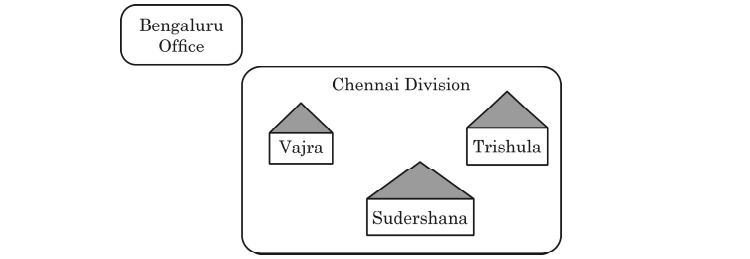
Infotainment Ltd. is an event management company with its prime office located in Bengaluru. The company is planning to open its new division at three different locations in Chennai named as - Vajra, Trishula and Sudershana. You, as a networking expert need to suggest solutions to the questions in part (i) to (v), keeping in mind the distances and other given parameters.
Distances between various locations:
| From - To | Distance |
|---|---|
| Vajra to Trishula | 350 m |
| Trishula to Sudershana | 415 m |
| Sudershana to Vajra | 300 m |
| Bengaluru Office to Chennai | 2000 km |
Number of Computers installed at various locations:
| Location | Computers |
|---|---|
| Vajra | 120 |
| Sudershana | 75 |
| Trishula | 65 |
| Bengaluru Office | 250 |
(i) Suggest and draw the cable layout to efficiently connect various locations in Chennai division for connecting the digital devices.
Star topology connecting Trishula and Sudershana to Vajra.
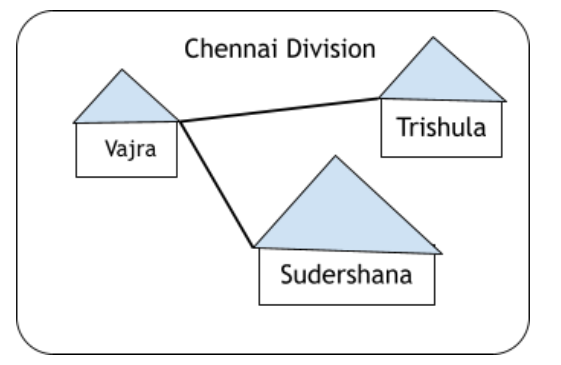
Star topology centered at Vajra minimises cable length given the distances.
Vajra can host the server, as it has the maximum number of computers (120).
Placing the server at the block with the largest user base reduces network traffic and cabling costs.
(iii) Which fast and effective wired transmission medium should be used to connect the prime office at Bengaluru with the Chennai division ?
Optical Fiber
Optical fiber provides high bandwidth and low attenuation, suitable for long-distance (~2000 km) wired links.
(iv) Which network device will be used to connect the digital devices within each location of Chennai division so that they may communicate with each other ?
Switch (or Hub / Router)
Switches connect multiple devices within a LAN segment.
(v) A considerable amount of data loss is noticed between the different locations of the Chennai division, which are connected in the network. Suggest a networking device that should be installed to refresh the data and reduce the data loss during transmission to and from different locations of Chennai division.
Repeater
A repeater regenerates weakened signals over long cable runs, reducing data loss.
(i) Give any two features of SQL.
(ii) Sumit wants to write a code in Python to display all the details of the passengers from the table flight in MySQL database, Travel. The table contains the following attributes: - F_code: Flight code (String) - F_name: Name of flight (String) - Source: Departure city of flight (String) - Destination: Destination city of flight (String)
Consider the following to establish connectivity between Python and MySQL: - Username: root - Password: airplane - Host: localhost
(i) Any two of the following: - Full form is Structured Query Language. - Is used to retrieve and view specific data from a table in a database. - Is case insensitive. - Each query in SQL ends with a semicolon (;). - It contains DDL and DML.
(ii)
import pymysql as pm

DB = pm.connect(host="localhost", user="root",
                password="airplane", database="Travel")
MyCursor = DB.cursor()
MyCursor.execute("SELECT * FROM flight")
Rec = MyCursor.fetchall()
for R in Rec:
    print(R)
DB.close()(i) Two acceptable SQL feature statements. (ii) Connects to MySQL, executes SELECT, fetches all rows, and prints them.