State True or False. "Identifiers are names used to identify a variable, function in a program".
[1]
30 March 2023 · Main paper
State True or False. "Identifiers are names used to identify a variable, function in a program".
True
True. Identifiers are user-defined names for variables, functions, etc.
(b) return
'return' is a reserved keyword in Python. 'false' (should be False), 'non_local' (should be nonlocal), and 'none' (should be None) are incorrect.
Given the following Tuple Tup= (10, 20, 30, 50) Which of the following statements will result in an error ?
(b) Tup.insert (2,3)
Tuples are immutable in Python, so they do not support methods like insert() that modify the collection.
Consider the given expression : 5<10 and 12>7 or not 7>4 Which of the following will be the correct output, if the given expression is evaluated ?
(a) True
5<10 is True, 12>7 is True. 'True and True' is True. 7>4 is True, 'not True' is False. 'True or False' is True.
Select the correct output of the code :
S = "Amrit Mahotsav @ 75"
A = S.partition(" ")
print(A)(d) ('Amrit','', 'Mahotsav @ 75')
str.partition(sep) returns a 3-tuple: (part_before_sep, sep, part_after_sep). Splitting on the first space gives ('Amrit', ' ', 'Mahotsav @ 75'). Note: the original paper printed lowercase 'a' which is an error; CBSE accepted (d) when reading 'A'.
(d) a
The 'a' (append) mode opens a file for writing and positions the file pointer at the end of the file.
Fill in the blank. _______ function is used to arrange the elements of a list in ascending order.
(a) sort()
The sort() method sorts the elements of a list in place. By default, it sorts in ascending order.
(b) !=
The '!=' (not equal) operator is a comparison operator that returns a boolean value (True or False).
Which of the following statement(s) would give an error after executing the following code ? Stud={"Murugan":100, "Mithu":95} # Statement 1 print (Stud[95]) # Statement 2 Stud ["Murugan"]=99 # Statement 3
print(Stud.pop()) # Statement 4
print(Stud) # Statement 5(d) Statements 2 and 4
Statement 2 fails because 95 is a value, not a key. Statement 4 fails because dict.pop() requires a key argument.
(d) Cardinality
Cardinality refers to the number of rows (tuples) in a relation (table).
The syntax of seek( ) is : file_object.seek(offset[,reference_point]) What is the default value of reference_point ?
(a) 0
The default value for the reference_point in seek() is 0, which represents the beginning of the file.
Fill in the blank : _______ clause is used with SELECT statement to display data in a sorted form with respect to a specified column.
(b) ORDER BY
The ORDER BY clause is used to sort the result set in ascending or descending order.
Fill in the blank : _______ is used for point-to-point communication or unicast communication such as radar and satellite.
(c) MICROWAVES
Microwaves are used for long-distance point-to-point communication like satellite and radar due to their line-of-sight propagation.
(b) 8.0
Operator precedence: * and / and % first. 3*5=15, 15/3=5.0, 5%2=1. Then +, -: 4 + 5.0 - 1 = 8.0.
(b) sum()
The built-in sum() function calculates the total of all numeric elements in an iterable like a list.
(b) List of tuples
The fetchall() method returns all rows from the query result as a list of tuples.
Assertion (A) : To use a function from a particular module, we need to import the module. Reason (R) : import statement can be written anywhere in the program, before using a function from that module.
(b) Both (A) and (R) are true and (R) is not the correct explanation for (A).
Both statements are true. (A) states a requirement for using modules. (R) is a true syntactic rule but does not explain *why* we must import — so (R) is not the correct explanation for (A).
Assertion (A) : A stack is a LIFO structure. Reason (R) : Any new element pushed into the stack always gets positioned at the index after the last existing element in the stack.
(c) (A) is true but (R) is false.
Stacks follow LIFO (Last In, First Out). (R) is considered false because a stack is defined abstractly by its 'top'; indices are an implementation detail, not part of the definition. CBSE also accepted (a) and (b) for full marks.
Atharva is a Python programmer working on a program to find and return the maximum value from the list. The code written below has syntactical errors. Rewrite the correct code and underline the corrections made.
def max_num (L) :
    max=L(0)
    for a in L :
        if a > max
            max=a
return maxdef max_num(L):
max = L[0] # Correction 1: L[0] instead of L(0)
for a in L:
if a > max: # Correction 2: added colon
max = a
return max # Correction 3: aligned outside the for loopThree corrections: (1) list indexing uses square brackets, so L(0) becomes L[0]; (2) the if statement is missing a colon; (3) return max must be at the function level, not nested inside the for loop.
Wired transmission uses physical cables (guided media) like twisted pair or fiber optics. Wireless transmission uses electromagnetic waves (unguided media) like radio waves or microwaves to transmit data through air/vacuum.
Wired is guided, Wireless is unguided.
URL (Uniform Resource Locator) is the complete address of a resource on the web (e.g., https://www.google.com/search). A Domain Name is just the human-readable address of the website's server (e.g., google.com), which is a part of the URL.
URL includes protocol, path etc. Domain is the site identifier.
Given is a Python list declaration : Listofnames=["Aman","Ankit","Ashish","Rajan","Rajat"] Write the output of : print (Listofnames [-1:-4:-1])
['Rajat', 'Rajan', 'Ashish']
Slicing [-1:-4:-1] starts at the last element, moves backwards, and stops before the 4th element from the end.
Consider the following tuple declaration : tupl=(10,20,30,(10,20,30),40) Write the output of : print(tupl.index(20))
1
The index() method returns the index of the first occurrence of the value 20, which is at index 1.
Explain the concept of "Alternate Key" in a Relational Database Management System with an appropriate example.
An Alternate Key is any Candidate Key that is not chosen to be the Primary Key. For example, in a Student table with Candidate Keys {AdmNo, RollNo}, if AdmNo is the Primary Key, then RollNo is the Alternate Key.
It's a candidate key not selected as primary.
(i) Hyper Text Markup Language (ii) Transmission Control Protocol
Standard technical acronyms.
Protocols are standard rules that govern data communication, ensuring that different devices can interpret signals correctly. Without protocols, devices would not be able to exchange information reliably.
Rules for communication/compatibility.
Write the output of the code given below :
def short_sub(lst, n):
    for i in range(0, n):
        if len(lst) > 4:
            lst[i] = lst[i] + lst[i]
        else:
            lst[i] = lst[i]

subject = ['CS', 'HINDI', 'PHYSICS', 'CHEMISTRY', 'MATHS']
short_sub(subject, 5)
print(subject)['CSCS', 'HINDIHINDI', 'PHYSICSPHYSICS', 'CHEMISTRYCHEMISTRY', 'MATHSMATHS']The list has 5 elements, so len(lst) > 4 is always True. Each element at indices 0–4 is replaced with itself concatenated with itself.
Write the output of the code given below :
a = 30
def call(x):
    global a
    if a % 2 == 0:
        x += a
    else:
        x -= a
    return x

x = 20
print(call(35), end="#")
print(call(40), end="@")65#70@a = 30 is even, so x += a is taken in both calls. First call: 35 + 30 = 65, printed with '#'. Second call: 40 + 30 = 70, printed with '@'.
CHAR is a fixed-length string type. Declaring CHAR(10) always reserves space for 10 characters; shorter values are padded with spaces on the right.
VARCHAR is a variable-length string type. Declaring VARCHAR(30) allows up to 30 characters but only uses the bytes needed for the actual data.
Example: To store 'India' — CHAR(20) occupies 20 bytes, whereas VARCHAR(20) occupies only about 5 bytes.
CHAR uses fixed storage with padding; VARCHAR uses only the storage required by the actual value.
DDL (any two): CREATE, ALTER, DROP
DML (any two): INSERT, UPDATE, DELETE, SELECT
DDL (Data Definition Language) defines or alters database schema; DML (Data Manipulation Language) reads and modifies the data within tables.
Consider the following tables – LOAN and BORROWER :
Table : LOAN
| LOAN_NO | B_NAME | AMOUNT |
|---|---|---|
| L-170 | DELHI | 3000 |
| L-230 | KANPUR | 4000 |
Table : BORROWER
| CUST_NAME | LOAN_NO |
|---|---|
| JOHN | L-171 |
| KRISH | L-230 |
| RAVYA | L-170 |
How many rows and columns will be there in the natural join of these two tables ?
Rows : 2
Columns : 4
Natural join matches rows on the common attribute LOAN_NO. L-170 and L-230 match in both tables (2 rows); L-171 has no match. Columns = (LOAN_NO, B_NAME, AMOUNT, CUST_NAME) — the shared LOAN_NO appears only once.
Write the output of the queries (i) to (iv) based on the table, WORKER given below :
Table : WORKER
| W_ID | F_NAME | L_NAME | CITY | STATE |
|---|---|---|---|---|
| 102 | SAHIL | KHAN | KANPUR | UTTAR PRADESH |
| 104 | SAMEER | PARIKH | ROOP NAGAR | PUNJAB |
| 105 | MARY | JONES | DELHI | DELHI |
| 106 | MAHIR | SHARMA | SONIPAT | HARYANA |
| 107 | ATHARVA | BHARDWAJ | DELHI | DELHI |
| 108 | VEDA | SHARMA | KANPUR | UTTAR PRADESH |
(i) SELECT F_NAME, CITY FROM WORKER ORDER BY STATE DESC;
(ii) SELECT DISTINCT(CITY) FROM WORKER;
(iii) SELECT F_NAME, STATE FROM WORKER WHERE L_NAME LIKE '_HA%';
(iv) SELECT CITY, COUNT(*) FROM WORKER GROUP BY CITY;
(i)
| F_NAME | CITY |
|---|---|
| SAHIL | KANPUR |
| VEDA | KANPUR |
| SAMEER | ROOP NAGAR |
| MAHIR | SONIPAT |
| MARY | DELHI |
| ATHARVA | DELHI |
(ii)
| CITY |
|---|
| KANPUR |
| ROOP NAGAR |
| DELHI |
| SONIPAT |
(iii)
| F_NAME | STATE |
|---|---|
| SAHIL | UTTAR PRADESH |
| MAHIR | HARYANA |
| ATHARVA | DELHI |
| VEDA | UTTAR PRADESH |
(iv)
| CITY | COUNT(*) |
|---|---|
| KANPUR | 2 |
| ROOP NAGAR | 1 |
| DELHI | 2 |
| SONIPAT | 1 |
(i) Sorted by STATE in descending order. (ii) DISTINCT removes duplicate city entries. (iii) The pattern '_HA%' matches names with any first char then 'HA' (KHAN, SHARMA, BHARDWAJ). (iv) Counts workers grouped by city.
Write the definition of a Python function named LongLines() which reads the contents of a text file named 'LINES.TXT' and displays those lines from the file which have at least 10 words in it.
For example, if the content of 'LINES.TXT' is :
Once upon a time, there was a woodcutter
He lived in a little house in a beautiful, green wood.
One day, he was merrily chopping some wood.
He saw a little girl skipping through the woods, whistling happily.
The girl was followed by a big gray wolf.
Then the function should display :
He lived in a little house in a beautiful, green wood.
He saw a little girl skipping through the woods, whistling happily.def LongLines():
with open('LINES.TXT', 'r') as myfile:
for line in myfile:
if len(line.split()) >= 10:
print(line)Opens the file, iterates line by line, splits each line on whitespace to get a word list, and prints lines whose word count is at least 10.
Write a function count_Dwords() in Python to count the words ending with a digit in a text file "Details.txt".
Example: If the file content is :
On seat2 VIP1 will sit and
On seat1 VVIP2 will be sitting
The output should be :
Number of words ending with a digit are 4def count_Dwords():
count = 0
with open("Details.txt", 'r') as F:
S = F.read()
Wlist = S.split()
for W in Wlist:
if W[-1].isdigit():
count += 1
print("Number of words ending with a digit are", count)Reads the file, splits the contents into words on whitespace, and checks the last character of each word with isdigit().
Write the outputs of the SQL queries (i) to (iv) based on the relations COMPUTER and SALES given below :
Table : COMPUTER
| PROD_ID | PROD_NAME | PRICE | COMPANY | TYPE |
|---|---|---|---|---|
| P001 | MOUSE | 200 | LOGITECH | INPUT |
| P002 | LASER PRINTER | 4000 | CANON | OUTPUT |
| P003 | KEYBOARD | 500 | LOGITECH | INPUT |
| P004 | JOYSTICK | 1000 | IBALL | INPUT |
| P005 | SPEAKER | 1200 | CREATIVE | OUTPUT |
| P006 | DESKJET PRINTER | 4300 | CANON | OUTPUT |
Table : SALES
| PROD_ID | QTY_SOLD | QUARTER |
|---|---|---|
| P002 | 4 | 1 |
| P003 | 2 | 2 |
| P001 | 3 | 2 |
| P004 | 2 | 1 |
(i) SELECT MIN(PRICE), MAX(PRICE) FROM COMPUTER;
(ii) SELECT COMPANY, COUNT(*) FROM COMPUTER GROUP BY COMPANY HAVING COUNT(COMPANY) > 1;
(iii) SELECT PROD_NAME, QTY_SOLD FROM COMPUTER C, SALES S WHERE C.PROD_ID = S.PROD_ID AND TYPE = 'INPUT';
(iv) SELECT PROD_NAME, COMPANY, QUARTER FROM COMPUTER C, SALES S WHERE C.PROD_ID = S.PROD_ID;
(i)
| MIN(PRICE) | MAX(PRICE) |
|---|---|
| 200 | 4300 |
(ii)
| COMPANY | COUNT(*) |
|---|---|
| LOGITECH | 2 |
| CANON | 2 |
(iii)
| PROD_NAME | QTY_SOLD |
|---|---|
| MOUSE | 3 |
| KEYBOARD | 2 |
| JOYSTICK | 2 |
(iv)
| PROD_NAME | COMPANY | QUARTER |
|---|---|---|
| MOUSE | LOGITECH | 2 |
| LASER PRINTER | CANON | 1 |
| KEYBOARD | LOGITECH | 2 |
| JOYSTICK | IBALL | 1 |
(i) MIN and MAX of PRICE. (ii) Groups by COMPANY and keeps only groups with more than 1 row. (iii) Joins on PROD_ID and filters INPUT-type products. (iv) Full equi-join on PROD_ID.
SHOW DATABASES;
Standard MySQL command to list available databases.
Write a function EOReplace() in Python, which accepts a list L of numbers. Thereafter, it increments all even numbers by 1 and decrements all odd numbers by 1.
Example : If the input list is :
L = [10, 20, 30, 40, 35, 55]The output will be :
L = [11, 21, 31, 41, 34, 54]def EOReplace(L):
for i in range(len(L)):
if L[i] % 2 == 0:
L[i] = L[i] + 1
else:
L[i] = L[i] - 1
print(L)Iterates the list by index. Even values are incremented by 1, odd values are decremented by 1. Modifying by index updates the list in place.
A list contains the following record of a customer : [Customer_name, Room_Type]
Write the following user defined functions to perform given operations on the stack named 'Hotel' :
(i) Push_Cust() – To Push customers' names of those customers who are staying in 'Delux' Room Type. (ii) Pop_Cust() – To Pop the names of customers from the stack and display them. Also, display "Underflow" when there are no customers in the stack.
For example, if the lists with customer details are :
["Siddharth", "Delux"]
["Rahul", "Standard"]
["Jerry", "Delux"]
The stack should contain : Jerry, Siddharth
And the output of Pop_Cust() should be :
Jerry
Siddharth
UnderflowHotel = []
Customer = [["Siddharth", "Delux"], ["Rahul", "Standard"], ["Jerry", "Delux"]]
def Push_Cust():
for rec in Customer:
if rec[1] == "Delux":
Hotel.append(rec[0])
def Pop_Cust():
while len(Hotel) > 0:
print(Hotel.pop())
else:
print("Underflow")Push_Cust filters customer records by Room_Type and appends matching names. Pop_Cust pops and prints until the stack is empty, then displays 'Underflow'.
Write a function in Python, Push(Vehicle) where Vehicle is a dictionary containing details of vehicles — {Car_Name: Maker}. The function should push the name of every car manufactured by 'TATA' (in any case — Tata, TaTa, etc.) onto the stack.
For example, if the dictionary contains :
Vehicle = {"Santro": "Hyundai", "Nexon": "TATA", "Safari": "Tata"}The stack should contain : Safari, Nexon
stack = []

def Push(Vehicle):
    for v_name in Vehicle:
        if Vehicle[v_name].upper() == "TATA":
stack.append(v_name)Iterates over the dictionary keys, normalises each value with .upper(), and appends qualifying keys to the stack.
Quickdev, an IT-based firm located in Delhi, is planning to set up a network for its four branches within the city with its Marketing department in Kanpur. As a network professional, give solutions to the questions (i) to (v), after going through the branches locations and other details which are given below:
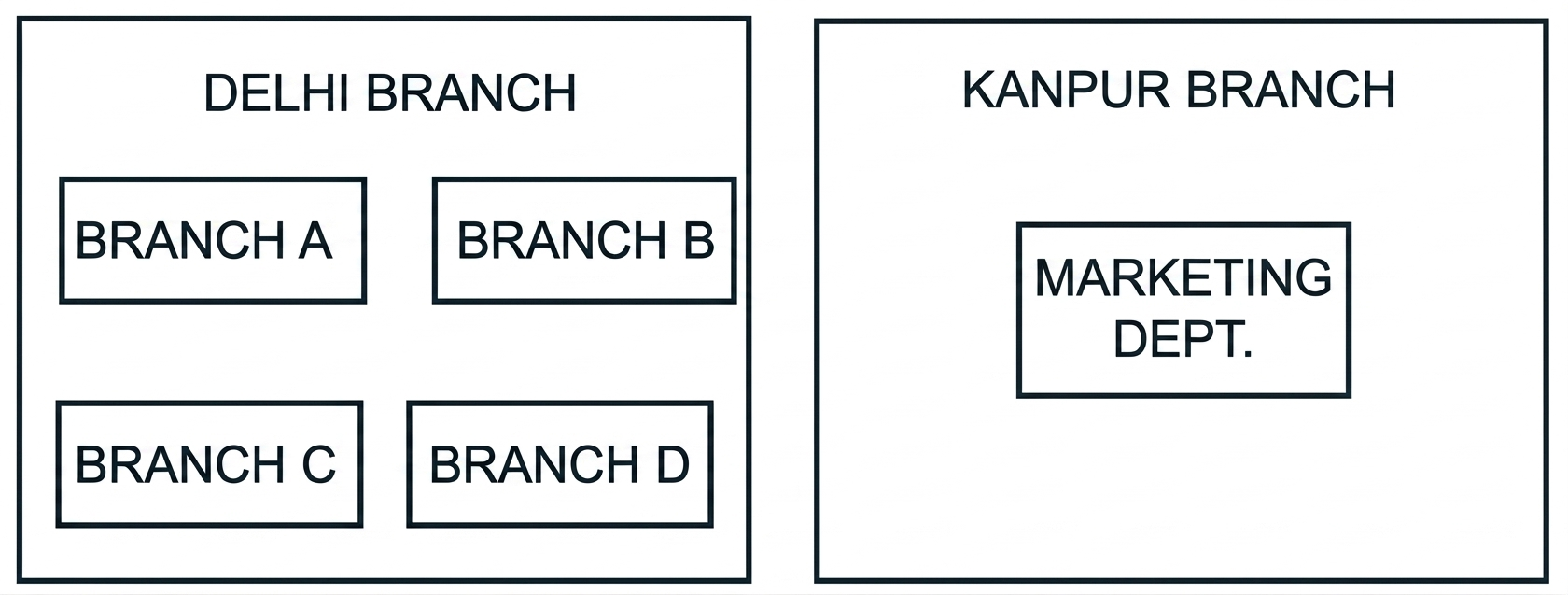
Distance between various branches is as follows :
| Branch | Distance |
|---|---|
| Branch A to Branch B | 40 m |
| Branch A to Branch C | 80 m |
| Branch A to Branch D | 65 m |
| Branch B to Branch C | 30 m |
| Branch B to Branch D | 35 m |
| Branch C to Branch D | 15 m |
| Delhi Branch to Kanpur | 300 km |
Number of computers in each of the branches :
| Branch | Number of Computers |
|---|---|
| Branch A | 15 |
| Branch B | 25 |
| Branch C | 40 |
| Branch D | 115 |
(i) Suggest the most suitable place to install the server for the Delhi branch with a suitable reason.
Branch D — it has the maximum number of computers.
Placing the server at the branch with the largest number of clients minimises overall network traffic and cabling cost. (Any other branch with valid justification is also acceptable.)
Star Topology
Ideally connected to the server at Branch D.
(iii) Which device will you suggest, that should be placed in each of these branches to efficiently connect all the computers within these branches ?
Switch (or Hub / Router)
A switch (or hub) connects multiple devices within a single LAN segment so they can communicate with each other.
(iv) Delhi firm is planning to connect to its Marketing department in Kanpur which is approximately 300 km away. Which type of network out of LAN, WAN or MAN will be formed ? Justify your answer.
WAN (Wide Area Network) — because the network spans different geographical locations of the country (approx. 300 km apart).
A WAN connects sites separated by large distances; LANs cover a single building/campus and MANs cover a city. 300 km between Delhi and Kanpur places this beyond both.
(v) Suggest a protocol that shall be needed to provide help for transferring of files between Delhi and Kanpur branch.
FTP (File Transfer Protocol)
FTP is the standard protocol for transferring files over a network.
What possible output(s) are expected to be displayed on screen at the time of execution of the following program ?
import random
M = [5, 10, 15, 20, 25, 30]
for i in range(1, 3):
    first = random.randint(2, 5) - 1
    sec = random.randint(3, 6) - 2
    third = random.randint(1, 4)
print(M[first], M[sec], M[third], sep="#")(a) 10#25#15 20#25#25
random.randint(2,5)-1 yields indices in {1,2,3,4}; random.randint(3,6)-2 yields {1,2,3,4}; random.randint(1,4) yields {1,2,3,4}. All three subscripts are always valid (1..4) and the separator '#' has no trailing '#' at the end of each line. Only option (a) satisfies these constraints on both iterations.
Predict the output of the code given below :
def makenew(mystr):
    newstr = ""
    count = 0
    for i in mystr:
        if count % 2 != 0:
            newstr = newstr + str(count)
        else:
            if i.lower():
                newstr = newstr + i.upper()
            else:
                newstr = newstr + i
        count += 1
    print(newstr)

makenew("No@1")N1@3Trace by character of "No@1": - count=0 (even): 'N' → upper → 'N'. newstr="N" - count=1 (odd): append str(1) → '1'. newstr="N1" - count=2 (even): '@'.lower() is truthy → upper → '@'. newstr="N1@" - count=3 (odd): append str(3) → '3'. newstr="N1@3"
The code given below deletes the record from the table employee which has the structure :
E_code  - String
E_name  - String
Sal     - Integer
City    - String
Note: Username is root, Password is root, the table exists in MySQL database named emp.
Write the following statements to complete the code : - Statement 1 — to import the desired library. - Statement 2 — to execute the command that deletes the record with E_code as 'E101'. - Statement 3 — to delete the record permanently from the database.
import __________ as mysql        # Statement 1

def delete():
    mydb = mysql.connect(host="localhost", user="root",
                         passwd="root", database="emp")
    mycursor = mydb.cursor()
    __________________            # Statement 2
    __________________            # Statement 3
print("Record deleted")import mysql.connector as mysql # Statement 1
mycursor.execute("DELETE FROM employee WHERE E_code='E101'") # Statement 2
mydb.commit() # Statement 3Statement 1 imports the MySQL connector. Statement 2 executes the DELETE query through the cursor. Statement 3 commits the transaction so the deletion is permanent.
The code given below reads the records from the table employee and displays only those whose city is 'Delhi'. The table has the structure :
E_code  - String
E_name  - String
Sal     - Integer
City    - String
Note: Username is root, Password is root, MySQL database is named emp.
Write the following statements to complete the code :
- Statement 1 — to import the desired library.
- Statement 2 — to execute the query that fetches records of employees from city 'Delhi'.
- Statement 3 — to read the complete data of the query into the object named details.
import __________ as mysql        # Statement 1

def display():
    mydb = mysql.connect(host="localhost", user="root",
                         passwd="root", database="emp")
    mycursor = mydb.cursor()
    __________________            # Statement 2
    details = ________            # Statement 3
    for i in details:
print(i)import mysql.connector as mysql # Statement 1
mycursor.execute("SELECT * FROM employee WHERE City='Delhi'") # Statement 2
details = mycursor.fetchall() # Statement 3Statement 1 imports the MySQL connector. Statement 2 runs a SELECT filtered by City='Delhi'. Statement 3 retrieves all matching rows from the cursor via fetchall().
Write one difference between CSV and text files. Write a program in Python that defines and calls the following user defined functions :
(i) COURIER_ADD() — It takes the values from the user and adds the details to a csv file 'courier.csv'. Each record consists of a list with field elements cid, s_name, Source, destination to store Courier ID, Sender name, Source and Destination address respectively.
(ii) COURIER_SEARCH() — Takes the destination as input and displays all the courier records going to that destination.
Difference between CSV and Text files :
- CSV files can be viewed in spreadsheets and require the csv module to be imported; text files can be viewed in a text editor and need no special module.
- CSV files store records as comma-separated values; text files store free-form text.
import csv

def COURIER_ADD():
    f1 = open("courier.csv", "a", newline="")
    writ = csv.writer(f1)
    cid = int(input("Enter the Courier id: "))
    s_name = input("Enter the Sender Name: ")
    Source = input("Enter the Source Address: ")
    destination = input("Enter Destination Name: ")
    detail = [cid, s_name, Source, destination]
    writ.writerow(detail)
    f1.close()

def COURIER_SEARCH():
    f1 = open("courier.csv", "r")
    detail = csv.reader(f1)
    name = input("Enter the Destination Name to be searched: ")
    for i in detail:
        if i[3] == name:
            print("Details of courier are: ", i)
    f1.close()

COURIER_ADD()
COURIER_SEARCH()COURIER_ADD opens the CSV in append mode and writes a list of fields with csv.writer. COURIER_SEARCH iterates rows using csv.reader and matches index 3 (destination) against the user's input.
Why is it important to close a file before exiting ? Write a program in Python that defines and calls the following user defined functions :
(i) Add_Book() — Takes the details of the books and adds them to a csv file 'Book.csv'. Each record consists of a list with field elements book_ID, B_name, pub to store book ID, book name and publisher respectively.
(ii) Search_Book() — Takes the publisher name as input and counts and displays the number of books published by them.
Why close a file ? It is important to close a file before exiting so that any unwritten or buffered data is flushed to disk and the system resources held by the file (file descriptor, memory buffers) are released back to the OS.
import csv

def Add_Book():
    f1 = open("Book.csv", "a", newline="")
    writ = csv.writer(f1)
    book_ID = int(input("Enter the Book id: "))
    B_name = input("Enter the Book Name: ")
    pub = input("Enter the Publisher Name: ")
    detail = [book_ID, B_name, pub]
    writ.writerow(detail)
    f1.close()

def Search_Book():
    f1 = open("Book.csv", "r")
    detail = csv.reader(f1)
    name = input("Enter the Publisher Name to be searched: ")
    pub_count = 0
    for i in detail:
        if i[2] == name:
            pub_count += 1
    print("NUMBER OF BOOKS: ", pub_count)
    f1.close()

Add_Book()
Search_Book()Add_Book opens 'Book.csv' in append mode and writes a single row. Search_Book reads each row and increments a counter whenever index 2 (publisher) matches the input.
The school has asked their estate manager Mr. Rahul to maintain the data of all the labs in a table LAB. Rahul has created the table and entered data of 5 labs.
Table : LAB
| LABNO | LAB_NAME | INCHARGE | CAPACITY | FLOOR |
|---|---|---|---|---|
| L001 | COMPUTER | VIJAY | 30 | II |
| L002 | CHEMISTRY | HARSH | 20 | I |
| L003 | BIOLOGY | SONIA | 20 | I |
| L004 | ENGLISH | GAGAN | 40 | II |
| L005 | MATHS | MEENU | 35 | III |
(i) Identify the columns which can be considered as Candidate keys.
Candidate keys : LABNO and LAB_NAME
Both LABNO and LAB_NAME contain unique, non-null values for every row, so either could serve as the primary key — that makes both candidate keys.
Degree = 5
Cardinality = 5
Degree is the number of attributes (columns): LABNO, LAB_NAME, INCHARGE, CAPACITY, FLOOR → 5. Cardinality is the number of tuples (rows) → 5.
(iii) Write the statements to : (a) Insert a new row with appropriate data. (b) Increase the capacity of all the labs by 10 students which are on 'I' Floor.
(a)
INSERT INTO LAB VALUES('L006', 'PHYSICS', 'RAVI', 25, 'II');(b)
UPDATE LAB SET CAPACITY = CAPACITY + 10 WHERE FLOOR = 'I';(a) INSERT INTO ... VALUES adds a new tuple supplying values for every column in declared order. (b) UPDATE with a WHERE clause modifies only rows whose FLOOR is 'I', incrementing CAPACITY by 10.
(iii) Write the statements to : (a) Add a constraint PRIMARY KEY to the column LABNO in the table LAB. (b) Delete the table LAB.
(a)
ALTER TABLE LAB ADD PRIMARY KEY (LABNO);(b)
DROP TABLE LAB;(a) ALTER TABLE ... ADD PRIMARY KEY attaches a primary-key constraint to an existing column. (b) DROP TABLE removes both the table structure and its data permanently.
Shreyas is a programmer who has been given the task of writing a function write_bin() to create a binary file Cust_file.dat containing customer records — customer number (c_no), name (c_name), quantity (qty), price (price) and amount (amt).
The function accepts c_no, c_name, qty and price. If qty is less than 10, it prints 'Quantity less than 10 ..... Cannot SAVE'. Otherwise it computes amt = price * qty and writes the record (as a list) to the binary file.
import pickle

def write_bin():
    bin_file = __________              # Statement 1
    while True:
        c_no = int(input("enter customer number"))
        c_name = input("enter customer name")
        qty = int(input("enter qty"))
        price = int(input("enter price"))
        if __________ :                # Statement 2
            print("Quantity less than 10..Cannot SAVE")
        else:
            amt = price * qty
            c_detail = [c_no, c_name, qty, price, amt]
            __________                 # Statement 3
            ans = input("Do you wish to enter more records y/n")
            if ans.lower() == 'n':
                __________             # Statement 4
    ______________                     # Statement 5

______________                         # Statement 6
Answer the following : (i) Write the correct Statement 1 to open 'Cust_file.dat' for writing. (ii) Write Statement 2 to check whether qty is less than 10. (iii) Write Statement 3 to write data to the binary file and Statement 4 to stop further processing if the user does not wish to enter more records.
(i) Statement 1 —
bin_file = open("Cust_file.dat", "wb")("ab" mode is also accepted.)
(ii) Statement 2 —
qty < 10(iii) Statement 3 —
pickle.dump(c_detail, bin_file)Statement 4 —
breakStatement 1 opens the file in binary-write mode. Statement 2 is the condition that flags a too-small quantity. Statement 3 serialises the record list to the binary file with pickle.dump. Statement 4 exits the while loop when the user has no more records to enter.
(iii) (Option only for part (iii))
What should Shreyas fill in :
- Statement 5 to close the binary file named Cust_file.dat ?
- Statement 6 to call the function write_bin() that writes data to the binary file ?
(Refer to the code template given in part (i) of question 35.)
Statement 5 —
bin_file.close()Statement 6 —
write_bin()Statement 5 releases the file resource, flushing any buffered bytes to disk. Statement 6 actually invokes the function so the file is created and populated.